Podcast Player
- 4.8
- Rating
- 10.00M
- Installs
- Free
- Price

 Analysis by App-foxy
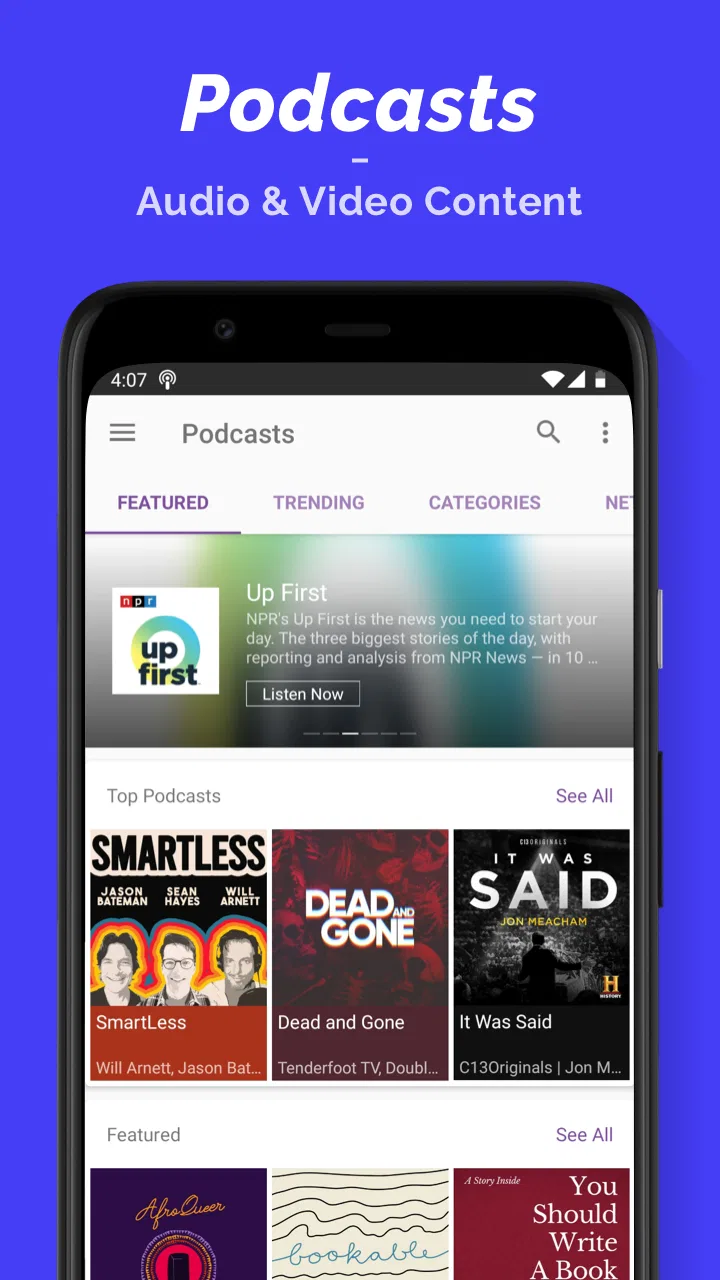
Choosing a podcast app sounds simple until you have a crowded subscription list, several audio formats, limited storage, and different listening habits at home and on the move. I spent time with Podcast Player as a general audio hub rather than judging it only by its short store label. My impression is that it is best understood as a broad listening app for people who want podcasts, audiobooks, and radio in one place, with enough flexibility to support both casual discovery and a more organized daily routine.
The app sits in the News & Magazines category, although that description only covers part of what it does. It is free to install, and its developer is Castbox.FM - Radio & Podcast & AudioBooks. The audience is clearly substantial: it has passed 10 million installs, with an average rating of 4.8 from roughly 307 thousand ratings. Those figures do not automatically make it right for everyone, but they suggest that the core listening experience works well for a large range of Android users.
What I considered before making a choice
My first decision criterion was concentration. A dedicated podcast app can be excellent when it keeps every screen focused on subscriptions, episodes, queues, and playback. Podcast Player takes a wider approach by placing podcasts alongside audiobooks and radio. That makes it more useful when my listening changes during the day, but it also means the app can feel busier than a narrowly focused podcast tool.
You May Also Like

 AccuWeather: Weather Radar
AccuWeather Review: A Quick, Clear Forecast for Everyday Decisions
For everyday plans, the best forecast is the one you can understand quickly. AccuWeather makes rain timing, radar, and local conditions easy to act on, with a few trade-offs.

 Hill Climb Racing
Why Hill Climb Racing Still Turns Crashes Into One More Run
A tiny car, a bumpy hill and one more upgrade: Hill Climb Racing keeps resurfacing because its simple chaos makes every near-miss feel personal.

 AliExpress - Shopping App
AliExpress Makes Global Shopping Feel Personal, but Shoppers Bear the Risk
AliExpress turns a global marketplace into a pocket-sized discovery engine. Its reach is useful, its shopping loop compelling, and its trade-offs easy to miss.

 Lords Mobile: Kingdom Wars
Lords Mobile Is a Kingdom-Building Routine, Not a Quick Match
A case-by-case verdict on the building, battles, device demands, and social commitments that make Lords Mobile rewarding for some players and exhausting for others.

 PDF Scanner app - TapScanner
TapScanner Makes Paperwork Easier to Capture, Check, and Share
TapScanner makes scanning with a phone feel less like a rescue operation and more like a dependable step in getting work done. Its capture tools are useful, though not flawless.

 Block Blast!
 Shows How Much a Puzzle Game Can Leave Out
A quiet grid game shows why puzzle players increasingly value instant clarity, repeatable skill and low-pressure play—and where the genre still needs to catch up.
More From Our News Desk
View All News


The second criterion was discovery. I do not always know exactly what I want to hear. Sometimes I follow a familiar show; other times I want a news discussion, a long-form story, or live radio. An app that handles only one of those jobs would force me to switch services. Here, the broader catalog concept is the main attraction. I can use it as a regular podcast player without treating the other audio sections as mandatory.
The third criterion was routine. For me, a useful player needs to reduce small decisions: finding the next episode, returning to an unfinished program, and moving between short listening sessions. Podcast Player is more appealing when used repeatedly than when opened only for occasional searches, because its value comes from becoming the place where different types of spoken audio meet.
I also looked at the practical entry point. The app works on Android devices running at least version 6.0, so it is not limited to recent phones. The current version is 9.16.1-251202123. I would still check how it feels on a particular device before moving an entire listening habit over, especially if the phone is older or has very little free storage.
A realistic day with the app
Imagine a weekday commute followed by household chores. In the morning, I might continue a news podcast for twenty minutes, then later switch to an audiobook while cooking. In the evening, I could browse radio content instead of searching for another app. That sequence is where Podcast Player makes sense: not because each individual function is necessarily better than every specialist alternative, but because the transition between them is convenient.
This mixed routine also reveals an important trade-off. A person who listens only to two carefully chosen podcasts may find the wider selection unnecessary. Someone who treats audio as background company throughout the day is more likely to appreciate having several formats available under one roof.
Where Podcast Player wins in everyday use
The strongest part of the experience is its role as a single starting point. I do not have to decide whether a listening session belongs in a podcast app, an audiobook app, or a radio app before I begin. That matters when I have a vague intention such as “I want something informative” rather than a specific show in mind.
It is also a sensible option for people who are still building their listening habits. New users may not yet know whether they prefer serialized reporting, interviews, fiction, educational programs, or radio. A broad app gives them room to test those styles without immediately maintaining several separate libraries.
Another practical strength is the free entry point. I can install it and evaluate the basic workflow before deciding whether it deserves a permanent place on my phone. In-app purchases range from $1.99 to $14.99 per item, so I would pay attention during any upgrade or content decision rather than assuming every part of the experience is included at no cost. The free starting point is useful, but it is not a reason to stop checking what a particular purchase covers.
I found the app most convincing when I treated it as a listening shelf rather than a simple search box. The difference is subtle. A search box helps me locate one program; a shelf helps me return to several kinds of audio over time. That approach favors users who like variety and want their entertainment and information sources close together.
Three ways to get more from it
First, I would separate discovery from routine listening. When I have spare time, I can explore unfamiliar audio. During a busy commute, I should open the shows or books I already know I want. This avoids turning every listening session into another browsing session, which is one of the easiest ways to waste time in a large audio catalog.
Second, I would use the app according to attention level. Short podcast sessions work well for errands and travel, while audiobooks are better when I can stay with one narrative. Radio is useful when I want immediacy and less commitment. Thinking in these three modes helps me choose faster than searching by topic alone.
Third, I would make a deliberate decision about switching. If my current app already has years of carefully arranged subscriptions and listening habits, the benefit of moving is not simply “more content.” The real gain would be combining formats. If I rarely use audiobooks or radio, that advantage may not compensate for rebuilding a familiar podcast workflow.
These are not flashy features; they are usage strategies. They matter because a broad app can become cluttered when everything is treated as equally important. I get better results when I decide what role each audio type plays in my day.
Who benefits most from the combined format
I would recommend this app first to listeners who regularly move between podcasts, audiobooks, and radio. It is also a good candidate for someone who wants a straightforward free starting point and does not want to maintain separate apps for every spoken-audio habit.
It suits families or shared households only if each person is comfortable with a general-purpose audio environment rather than a highly personalized specialist service. A user who wants a very controlled, minimalist podcast list may prefer less variety. Likewise, people who mainly listen to music should not choose it expecting a music-first experience; the app’s identity is spoken and broadcast audio.
The Teen content rating is worth noticing for households where a younger listener may use the device. I would still supervise choices personally, because a general rating does not replace checking whether individual programs match a family’s standards.
Where another type of app may fit better
The usual alternative is a dedicated podcast player. That kind of app can be a better fit for someone who cares about a tightly managed subscription library, a very focused queue, or a workflow built entirely around episodes. I am not saying Podcast Player cannot support organized listening; rather, its broader identity means the experience is less narrowly defined.
A separate audiobook service may also be preferable for a reader who spends most listening time on long books. Specialist services often make the book collection, progress, and reading history the center of attention. If that is the only audio I use, adding podcasts and radio may feel like visual noise instead of useful freedom.
Radio-focused listeners have a similar choice. If live stations are the main reason I open an app, a service built primarily around radio browsing may feel more direct. Podcast Player is more compelling when radio is one part of a wider routine, not the entire purpose.
There is also a question of portability between ecosystems. Android users can try this app directly because it supports Android 6.0 and later. Someone who regularly moves between Android and iOS should compare the experience on both platforms before committing to a complete migration. I would not move a long-established library based solely on the Android listing or on the rating.
The app may not be the right choice for users who dislike in-app purchasing prompts or who want absolute clarity that every desired piece of content is included without additional decisions. Since individual in-app purchases run from $1.99 to $14.99, I would review the purchase screen carefully. That is a small habit, but it prevents a free installation from being mistaken for an entirely purchase-free catalog.
The friction I noticed in the broader approach
Variety creates navigation pressure. When podcasts, audiobooks, and radio share the same general destination, I have more possibilities but also more choices to filter. The app rewards users who know how they want to listen. It is less ideal for someone who wants a nearly invisible interface that presents only a short list of subscribed shows.
Discovery can also become a distraction. Recommendations and browsing are helpful when I am curious, but they can pull me away from the episode I intended to finish. My practical solution is to decide before opening the app whether I am searching or listening. That simple boundary makes the experience feel calmer.
I would also avoid judging the app solely by its average rating. A 4.8 average is encouraging, and around 33 thousand written reviews provide a large amount of user feedback, but ratings combine many different expectations. A person praising the app for radio access may be using it very differently from someone evaluating it as a strict podcast organizer.
What switching really costs
Moving to a new audio app is rarely difficult because of installation. The cost is usually mental: remembering where subscriptions are, learning how the queue behaves, and deciding which old habits are worth rebuilding. With Podcast Player, the switch makes the most sense when I want to consolidate formats, not merely replace one podcast player with another.
I would begin with a small trial period. I would follow a few essential podcasts, test an audiobook session, and try radio at a time when I normally listen. That gives me a realistic answer to the important question: does the combined environment save effort, or does it add another layer of browsing?
I would also keep the old app available until the new routine feels natural. This is especially important for anyone with a carefully maintained listening history. A gradual move avoids turning one app decision into a stressful all-or-nothing change.
Storage and connectivity should influence the decision as well. Spoken audio can occupy meaningful space when saved for later, and long listening sessions can expose weaknesses in a phone’s storage or data plan. I would plan downloads around actual trips rather than saving everything that looks interesting. That approach is useful in Podcast Player because its broad selection can make over-collecting especially tempting.
For paid content, I would make purchases only after confirming that the item matches my intended listening format and that I will use it. The stated purchase range is broad enough that casual taps deserve attention. Free installation lowers the barrier to testing, but careful selection keeps the overall cost under control.
Questions I would answer before installing
Is it only for podcasts? No. Podcasts are central, but the app also brings together audiobooks and radio. That combination is its defining reason to choose it over a narrowly focused player.
Can I use it without paying immediately? Yes, the app is free to install. However, in-app purchases are available, priced per item between $1.99 and $14.99, so I would inspect individual purchase details before confirming anything.
Will it work on an older Android phone? It supports Android 6.0 and later. Whether it feels comfortable on a particular older device depends on the phone’s available space and general performance, so I would test it rather than assume every older handset will feel identical.
Is it suitable for a focused podcast listener? It can be, but I would choose it mainly if the extra audiobook and radio options are useful. If I want nothing beyond a compact podcast workflow, a dedicated alternative may feel more efficient.
Is it appropriate for every younger listener? The content rating is Teen. I would treat that as a broad guide and still check individual programs before handing the phone to a child or younger teenager.
My recommendation after using it as a decision, not a default
Podcast Player is a strong choice for Android listeners who want one place for podcasts, audiobooks, and radio. Its biggest advantage is not a single clever tool; it is the reduction in app switching. I can move from a subscribed show to a longer book or a radio session without changing my entire listening environment.
I would recommend it to curious listeners, commuters, people building a new audio habit, and anyone who values variety more than a minimalist interface. The free installation makes experimentation easy, while the large user base and 4.8 average suggest that the central experience has broad appeal.
I would skip it if my needs are extremely narrow. A specialist podcast player may be better for someone who wants a carefully controlled subscription workflow, while an audiobook or radio specialist may be more satisfying when one format dominates every listening session. I would also be cautious if I dislike browsing, want to avoid purchase decisions, or already have a perfectly efficient setup that does not need consolidation.
My final view is positive but conditional: Podcast Player is most valuable when variety is the problem you are trying to solve. It is not automatically the best replacement for every audio app. I would install it, test my normal commute and one longer listening session, then decide whether the convenience of combining formats outweighs the extra choice. For my own mixed routine, that balance makes it worth recommending.
The app was released on Jan 4, 2016, and its continuing presence alongside a current version shows that it is not a short-lived experiment. I would still judge it by my habits rather than its age or popularity. If your day includes several kinds of spoken audio, this free News & Magazines app deserves a serious trial; if you want only the cleanest possible podcast shelf, look at dedicated alternatives before making the switch.
FAQs for Podcast Player
01What platforms is the Podcast Player app available on?
The Podcast Player app is available for both Android and iOS devices. You can download it from the Google Play Store for Android devices or the Apple App Store for iOS devices. It's designed to offer a seamless experience across different platforms, ensuring you can enjoy your favorite podcasts anytime, anywhere.
02Does the Podcast Player app support offline listening?
Yes, the Podcast Player app supports offline listening. You can download episodes directly to your device, allowing you to listen without an internet connection. This feature is particularly useful for users who want to save on data usage or enjoy podcasts while traveling without reliable internet access.
03Are there any subscription or hidden fees in the Podcast Player app?
The Podcast Player app offers a free version with ads and optional in-app purchases. There is also a premium subscription available that removes ads and provides additional features like enhanced audio quality and early access to new episodes. Be sure to review the pricing and features before subscribing.
04Can I customize my listening experience in the Podcast Player app?
Absolutely! The Podcast Player app is highly customizable, allowing you to adjust playback speed, create playlists, and set sleep timers. You can also organize your library into categories or personalize the app's appearance to fit your preferences, making it a great choice for users who want a tailored listening experience.
05Is the Podcast Player app compatible with smart home devices?
Yes, the Podcast Player app is compatible with various smart home devices, including Google Home and Amazon Echo. You can use voice commands to play, pause, or skip episodes, making it easy to integrate your podcast listening into your smart home ecosystem and control playback hands-free.
Pros
- User-friendly interface with easy navigation.
- Wide range of podcasts across genres.
- Offline listening available for convenience.
- Customizable playback speed options.
- Seamless integration with smart devices.
Cons
- Occasional bugs during playback.
- Limited free features; premium needed.
- Ads can be intrusive for free users.
- Some episodes take time to load.
- No personalized recommendations.

Podcast Player
Gallery